A crypto wallet lets you hold, send, swap, and spend digital assets while connecting to blockchain networks and onchain markets. Setting one up is usually simple, but choosing how you want to use it matters just as much.
This guide explains how to set up a crypto wallet with
Bitget Wallet, from creating your wallet and adding funds to sending stablecoins, buying crypto with fiat, and using your assets for everyday payments and global markets.
Key takeaways
-
A crypto wallet lets you manage digital assets and interact directly with blockchain networks.
-
Bitget Wallet offers different setup and recovery options, including standard wallets and Social Login where available.
-
Once your wallet is ready, you can buy, send, swap, save, spend, and manage crypto from one account.
-
Local payment methods make it possible to move between fiat and crypto without relying on a separate exchange for every transaction.
-
Self-custody gives you control of your assets, while built-in security features help protect wallet access and transactions.
What can you do with a crypto wallet?
A crypto wallet is more than a place to store tokens.
At the most basic level, it gives you control over assets on blockchain networks. From there, what you can do depends on the wallet and the networks it supports.
For example, you might use a wallet for:
-
Buying crypto: Buy Bitcoin, stablecoins, and other supported assets with fiat.
-
Sending and receiving: Send crypto to another wallet or transfer stablecoins across borders.
-
Trading and swapping:
Swap one asset for another or access onchain markets.
-
Spending: Pay for goods and services with crypto cards, QR payments, or other supported payment methods.
-
Saving: Hold eligible stablecoins and explore available earning products.
-
Investing: Access
tokenized stocks, ETFs, commodities, and other onchain assets.
-
Using Web3: Connect to decentralized applications and interact with blockchain-based services.
This is why choosing a wallet based only on how it stores crypto can be limiting. If you want to use crypto for everyday finance, it helps to choose one that also supports the payments, currencies, networks, and markets you expect to use.
Why use Bitget Wallet?
For many people, the hardest part of crypto isn't buying a token. It's figuring out how to move between traditional money and digital money, send it, spend it, and manage everything without jumping between different platforms.
It is a self-custodial crypto wallet that brings buying, saving, sending, spending, and access to global onchain markets into one account. More than 100 million users use Bitget Wallet to manage digital assets across supported blockchain networks.
That means you can start with something familiar, such as buying crypto with a card or bank transfer, and then continue using the same wallet to send stablecoins, swap assets, spend with a crypto card, or explore onchain markets.
Move between fiat and crypto more easily
Bitget Wallet supports more than 80 payment methods and 100 fiat currencies across available onramp and off-ramp services. Depending on your location, you may be able to use cards, bank transfers, and other local payment methods.
For you, the practical benefit is simple: you can start with the currency you already use instead of first finding a separate platform just to convert your money into crypto.
Send digital dollars across borders
Stablecoins such as USDT and USDC can be sent across supported blockchain networks without relying on traditional international wire transfers.
Bitget Wallet also supports payment links, so you can send funds through a link shared in messaging apps such as WhatsApp or Telegram. This can make sending crypto less intimidating for someone who is new to
wallet addresses.
You can also send stablecoins across supported networks, giving you a way to move digital dollars when traditional cross-border payment options are slow or expensive.
Use crypto for everyday spending
Crypto does not have to stay in your wallet.
With Bitget Wallet, eligible assets can be used through the
Bitget Wallet Card, supported QR payment networks, and stablecoin-to-bank transfers in available markets.
The Bitget Wallet Card is available in 50+ countries and regions through supported Visa and Mastercard networks. Eligible purchases can also earn up to
3% assetback in assets such as USDC, Bitcoin, gold, and tokenized stocks and ETFs.
This turns the wallet from somewhere you simply hold crypto into something you can use for everyday purchases.
Keep savings and markets in the same wallet
Once you hold stablecoins, you may want to do more than simply leave them unused.
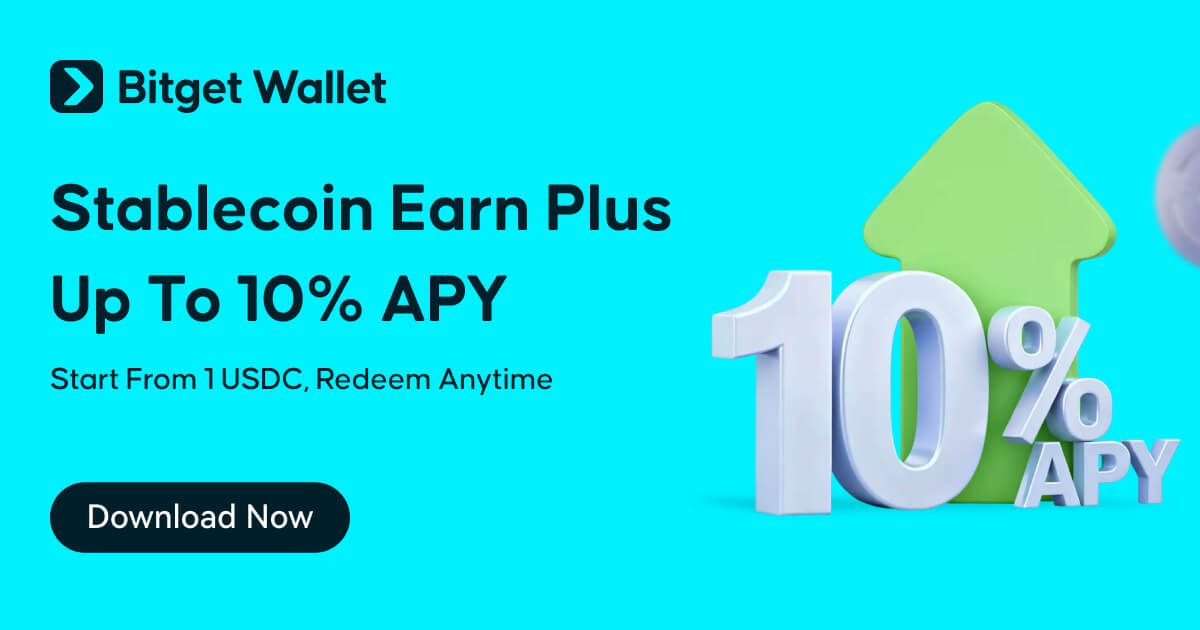
Bitget Wallet Earn products offer stablecoin yields of around 3–10% APY, with flexible access depending on the product. This gives users a way to explore potential returns on eligible assets while keeping their savings and other crypto activities in the same wallet.
The wallet also provides access to more than 1 million crypto and tokenized assets across 130+ blockchains, including available tokenized stocks, ETFs, and commodities.
So the same wallet can take you from buying your first stablecoin to managing a broader range of onchain assets.
How to set up Bitget Wallet
Once you know what you want a wallet to do, setting one up is straightforward.
Bitget Wallet supports different account types and access methods, so the exact screens you see can vary by wallet type, app version, and region.
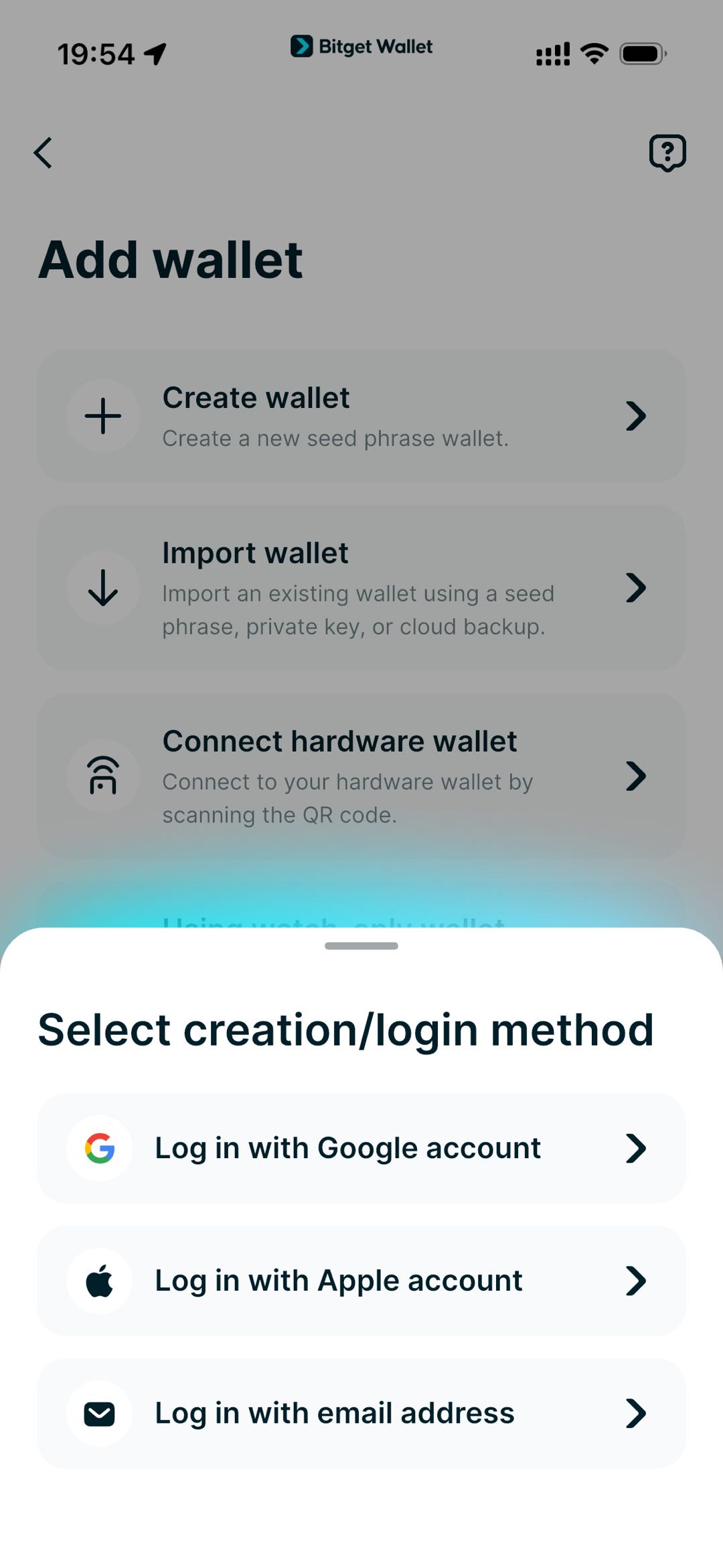
1. Download the official Bitget Wallet app
Open the app and choose the option to create a new wallet.
If you already have a crypto wallet, you can instead choose an available option to import your existing wallet.
Always use the official app or extension when creating or importing a wallet. Your recovery information should never be entered into an unverified website or application.
2. Choose how you want to access your wallet
Bitget Wallet gives you different ways to create and access your wallet.
A standard wallet can use a traditional recovery method such as a seed phrase. If you prefer a more familiar account experience, Social Login is available in supported setups using Google, Apple ID, or email.
This matters for beginners because getting started with self-custody does not necessarily mean learning an unfamiliar login system first.
With Social Login, you can use a familiar account to access your wallet while the wallet's security infrastructure handles key protection behind the scenes.
A crypto wallet lets you hold, send, swap, and spend digital assets while connecting to blockchain networks and onchain markets. Setting one up is usually simple, but choosing how you want to use it matters just as much.
This guide explains how to set up a crypto wallet with
Bitget Wallet, from creating your wallet and adding funds to sending stablecoins, buying crypto with fiat, and using your assets for everyday payments and global markets.
3. Complete your security setup
Follow the instructions in the app to set up your wallet credentials and security options.
Depending on the wallet type, this may include setting a PIN, password, or transaction security credential.
If you create a standard wallet, you will also need to follow the instructions for backing up your recovery information.
If you use a keyless or Social Login wallet, follow the backup and recovery process provided in the app.
The goal is to make sure you can securely access your wallet later, not simply to complete the initial setup.
4. Add the networks you need
After creating your wallet, you can use the blockchain networks supported by your account.
A multi-chain wallet can be useful if you regularly move between ecosystems. Instead of maintaining separate wallets for different networks, you can manage supported assets from the same wallet interface.
Always check the network before sending or receiving crypto. An asset such as USDT can exist on multiple networks, and the sending and receiving networks need to match.
5. Fund your wallet
Your wallet is now ready to receive assets.
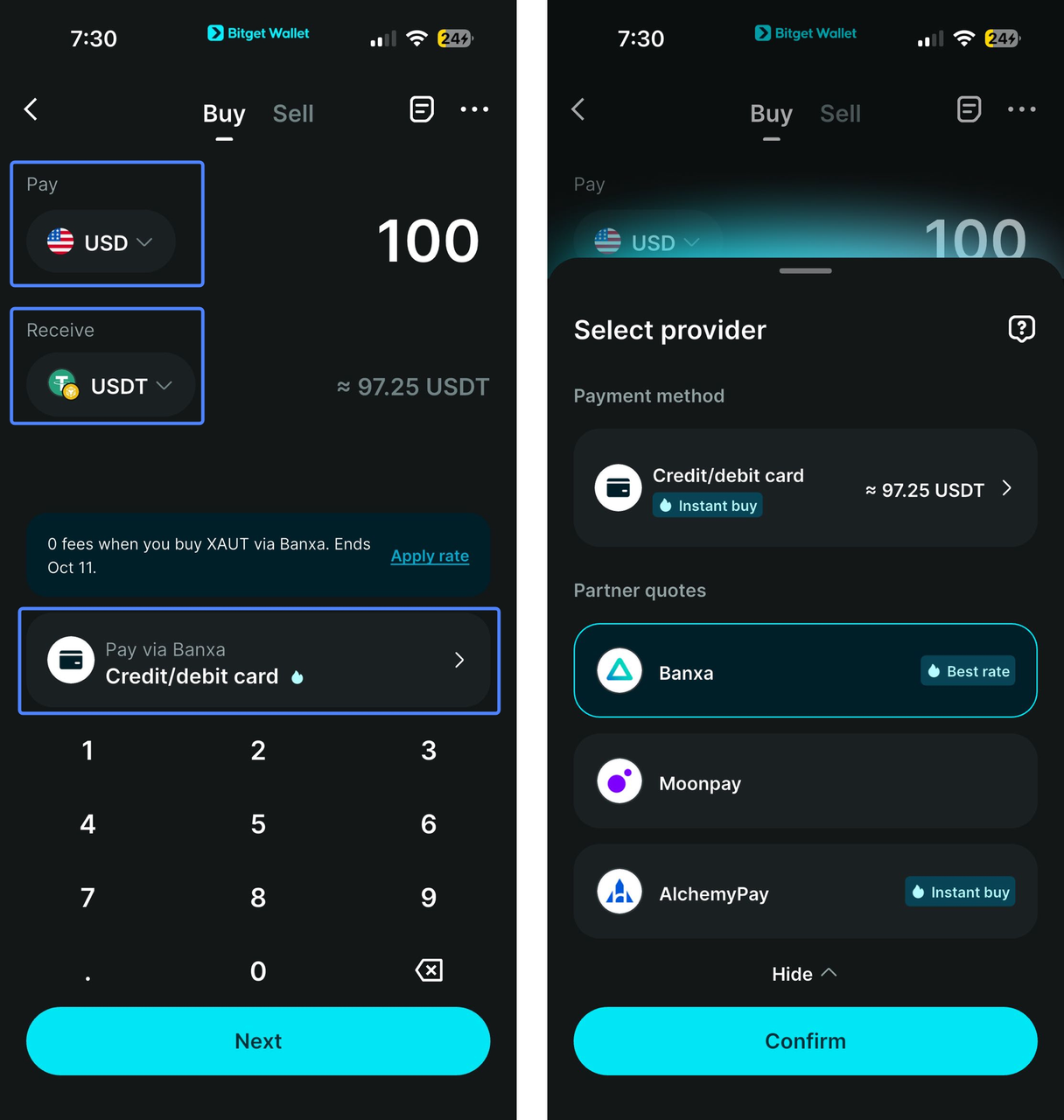
You can transfer crypto from another wallet or platform, or use an available Buy Crypto option to purchase supported assets with fiat.
Depending on your location, payment options may include
cards, bank transfers, and other local methods.
Before confirming a purchase, check the asset, network, payment method, quoted exchange rate, fees, and final amount.
What to do after setting up your wallet
Creating the wallet is only the beginning. The next step is to use it for something useful.
Buy crypto with fiat
If you don't already own crypto, you can start with the Buy Crypto feature.
Available payment providers can let you purchase supported assets using fiat. Depending on your location, this can include
cards, bank transfers, and other payment methods.
This creates a simple path from traditional money to digital assets: choose the asset, select an available payment method, review the quote, and complete the purchase.
Send and receive stablecoins
Stablecoins can be useful when you want to move dollar-denominated value without using a traditional bank transfer.
To receive crypto, share your wallet address or available QR code.
To send crypto, enter the recipient's address, select the network, enter the amount, and review the transaction before confirming.
Bitget Wallet can also support payment links, which can be useful when sending funds to someone through a messaging app.
Swap assets
You don't always need to sell one asset back into fiat before buying another.
A wallet with built-in swap functionality lets you exchange supported assets directly. For example, you might swap a stablecoin for another token when you want to use it on a different blockchain application.
Bitget Wallet supports
crypto swapping and trading across supported networks, so you can manage different assets without moving everything to a separate platform first.
Spend crypto
For users who want to bring crypto into everyday life, payment options can make a bigger difference than simply having a large list of supported tokens.
Bitget Wallet supports the Bitget Wallet Card, QR payments, and local payment options in supported markets.
With the
Bitget Wallet Card, eligible crypto can be used for purchases through supported Visa or Mastercard networks. Virtual cards can also support Apple Pay and Google Pay where available, while physical cards can provide ATM access.
This means the crypto you hold in your wallet can become usable for everyday spending rather than remaining an asset you only trade.
Earn on eligible stablecoins
If you hold stablecoins for longer periods, you may want them to do more than sit in your wallet.
Bitget Wallet Earn products provide access to stablecoin yields of around 3–10% APY. Some products offer flexible access, so you can withdraw without a fixed lock-up period.
The important point is that the wallet can support both sides of the journey: using stablecoins as digital dollars and exploring ways to put eligible holdings to work.
Rates, products, and availability can change, so review the current terms before depositing assets.
Access global onchain markets
Crypto wallets can also open access to assets that are difficult to reach through traditional financial apps.
Bitget Wallet supports more than 1 million crypto and tokenized assets across 130+ blockchains. Available assets include cryptocurrencies, tokenized stocks, ETFs, and commodities.
That means you can use one wallet to manage everyday digital dollars while also exploring global markets onchain.
How is Bitget Wallet secured?
Self-custody gives you control over your assets, but that control needs to be supported by strong security.
Bitget Wallet uses several layers of protection so that users don't have to rely on a single security measure.
Hardware-backed key protection
For supported wallet setups, Trusted Execution Environment (TEE) technology helps isolate sensitive key-management and signing operations in a hardware-backed environment.
For users, this means critical wallet operations are protected by an additional layer at the device level rather than relying only on software security.
Real-time protection against transaction risks
A bigger crypto balance also means more reason to check what you're signing.
Bitget Wallet's GetShield risk engine monitors tokens, addresses, and transactions for potential threats such as phishing, malicious contracts, and other transaction risks. MEV front-run protection also helps protect supported trades from certain forms of transaction manipulation.
The practical benefit is that security checks can happen as you use the wallet, rather than leaving you to identify every potential threat yourself.
Independent security checks
Bitget Wallet's security infrastructure has been audited by firms including CertiK and SlowMist, with additional data from security and blockchain analytics providers such as GoPlus, DeBank, and RootData.
For users, independent checks provide another layer of scrutiny around the wallet's security infrastructure instead of requiring you to take security claims at face value.
$300 million User Protection Fund
Security cannot eliminate every possible risk in crypto.
Bitget Wallet's $300 million User Protection Fund provides additional backing for certain systemic and platform-level risks. In practical terms, it gives users an additional layer of protection beyond the security controls built into the wallet itself.
This is particularly relevant in a self-custodial wallet: you retain control of your assets, while the broader platform also maintains protection measures designed to address risks that go beyond an individual device or transaction.
How to keep your crypto wallet secure
Security features work best alongside good wallet habits.
Protect your recovery information
If you use a seed phrase or private key, keep it private and store it securely. Never share it through messages, forms, screenshots, or support conversations.
For keyless or Social Login wallets, follow the wallet's recommended backup and recovery process.
Check the network before sending
Always confirm the asset, recipient address, and blockchain network before approving a transfer.
This is particularly important for assets such as USDT and USDC, which can exist on multiple networks.
Understand what you are signing
When connecting to a DApp or approving a transaction, check what the transaction is asking you to authorize.
A wallet can help identify risks, but you should still review the transaction before signing.
Use official sources
Only download Bitget Wallet from official sources and access wallet services through verified channels.
No legitimate support representative should ask you to send them your seed phrase or private key.
A crypto wallet for more than holding crypto
Setting up a crypto wallet is the first step toward using blockchain-based finance in a practical way.
With Bitget Wallet, that can mean buying crypto with your local currency, sending digital dollars across borders, spending eligible assets in everyday life, earning on eligible stablecoins, and accessing global onchain markets without switching between multiple financial apps.
The experience starts with creating a wallet, but the real value comes from what you can do with it afterwards.
If you're new to crypto, start small: create your wallet, complete the security setup, fund it with a supported asset, and make a simple transaction. Once you're comfortable with the basics, you can explore the wider range of payment, savings, trading, and market-access features available in Bitget Wallet.
FAQ
How do I create a crypto wallet?
Download the official Bitget Wallet app or extension, choose Create Wallet, and complete the security and backup steps. Depending on the available setup, you can use a standard wallet or Social Login with Google, Apple ID, or email.
How do I set up a Bitcoin wallet?
Bitget Wallet supports Bitcoin, so you can create a wallet to receive, send, and manage BTC. When making a transaction, always check the Bitcoin network and wallet address before confirming.
Can I create a crypto wallet without a seed phrase?
Yes. Bitget Wallet supports Social Login with Google, Apple ID, or email where available, giving you an alternative to managing a traditional seed phrase.
Can I buy crypto with fiat after setting up a wallet?
Yes. Bitget Wallet supports cards, bank transfers, and other local payment methods where available, letting you buy supported crypto directly with fiat.
Is Bitget Wallet self-custodial?
Yes. Bitget Wallet is self-custodial, meaning you retain control and ownership of your assets while managing buying, sending, swapping, spending, and other crypto activities from one account.



 Arc Wallet Guide: How to Get Started With Arc in Bitget Wallet2026-09-19 | 5 mins
 What Is a Crypto Bridge? How to Move Crypto Between Blockchains2026-09-04 | 3 mins


