


How to Buy Crypto with a Visa Card: 2026 Guide
2026-10-05
Buying crypto with a Visa card gives you a familiar way to move from fiat into digital assets without first making a bank transfer. Depending on your location and available payment providers, you can use a Visa credit or debit card to buy Bitcoin, stablecoins, and other supported cryptocurrencies.
A few details matter before you pay, including the payment provider, KYC requirements, fees, and blockchain network. This guide explains how buying crypto with a Visa card works, what to check before paying, and how to complete your purchase through
Bitget Wallet.
Key takeaways
-
You can buy crypto with a Visa card when your card, region, and payment provider support cryptocurrency purchases.
-
Credit and debit cards are generally the most straightforward options, while prepaid, virtual, and gift cards can have additional restrictions.
-
Bitget Wallet connects you with integrated payment providers so you can buy supported crypto within the wallet.
-
Before paying, check the crypto asset, network, payment provider, exchange rate, and total cost.
-
After your crypto arrives, you can hold, swap, send, spend, or use eligible assets with other wallet features.
Buying crypto with a Visa card
You can buy crypto with a Visa card through a
crypto wallet, exchange, or payment provider that supports card payments.
The basic process is similar to an online card purchase. You choose the cryptocurrency and amount, select an available payment provider, complete identity verification when required, and pay with your Visa card. Once the payment is processed, the purchased crypto is delivered to the wallet used for the transaction.
Which Visa cards can you use to buy crypto?
Credit and debit cards are generally the most straightforward options. Prepaid, virtual, and gift cards can have additional restrictions.
| Visa card type | What to know when buying crypto |
| Credit or debit card | Commonly used for online payments, but the card issuer and payment provider must allow crypto transactions. |
| Prepaid Visa | Acceptance depends on the issuer and whether the card supports cryptocurrency purchases. |
| Virtual Visa | Acceptance depends on the provider and the card's online transaction restrictions. |
| Visa gift card | Some issuers restrict cryptocurrency purchases, so acceptance is not guaranteed. |
If you want to buy crypto with a prepaid, virtual, or gift Visa card, check its transaction restrictions before starting the purchase. The payment provider may also limit which card types it accepts in your region.
Understanding payment providers and fees
The Buy Crypto feature connects you with available payment providers, allowing you to purchase supported cryptocurrencies using bank transfers, credit cards, and other online payment methods.
The wallet automatically recommends a payment provider for your purchase. If multiple providers are available, you can switch between them.
Providers can differ in their:
-
Supported payment methods
-
Available cryptocurrencies
-
Exchange rates and quotes
-
Fees
-
Regional availability
-
Purchase limits
If you specifically want to buy crypto with a Visa card, check the payment options shown by the selected provider before continuing.
What fees apply when buying crypto with a Visa card?
There is no single fee for every Visa crypto purchase.
Your total cost can vary based on the payment provider, cryptocurrency, fiat currency, region, exchange rate, and transaction at the time of purchase. The amount you receive can therefore differ between providers even when you enter the same fiat amount.
Instead of looking only at the advertised transaction fee, compare the total fiat amount you pay with the amount of crypto you receive.
The exchange rate is also important. A provider with a lower stated fee can still result in a different effective cost if its quoted crypto price differs.
How to buy crypto with a Visa card on Bitget Wallet
Once you have chosen your asset and payment method, you can complete the purchase directly through the wallet.
-
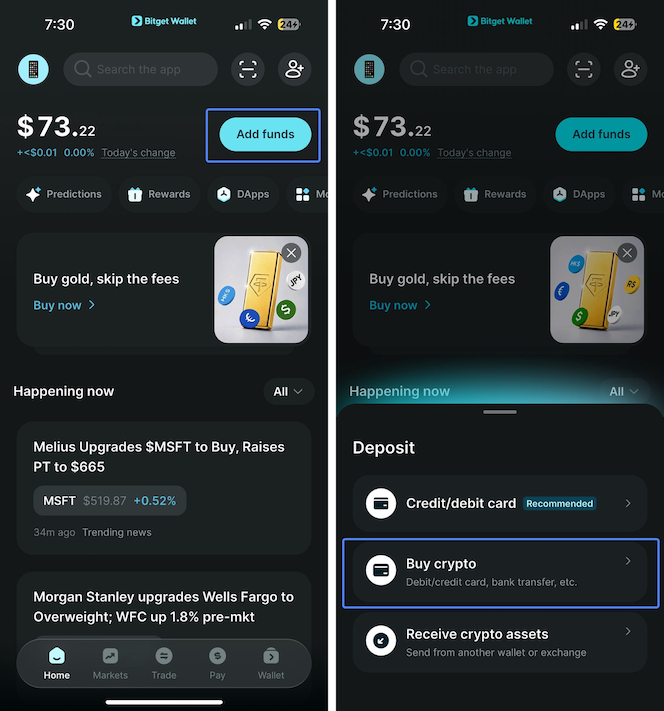
Choose the crypto you want to buy
Open
Bitget Wallet and go to
Add funds > Buy crypto.
Select the cryptocurrency you want to purchase, enter the amount, and choose your fiat payment currency.
Before continuing, check the blockchain network carefully. Many tokens are available on multiple networks, and the network you select determines where the asset will arrive and which networks you can use when you later send it.
If you are buying a network's native asset, make sure you select the correct network. For example, ETH on Ethereum and SOL on Solana are native assets used to pay network fees on their respective blockchains.
-
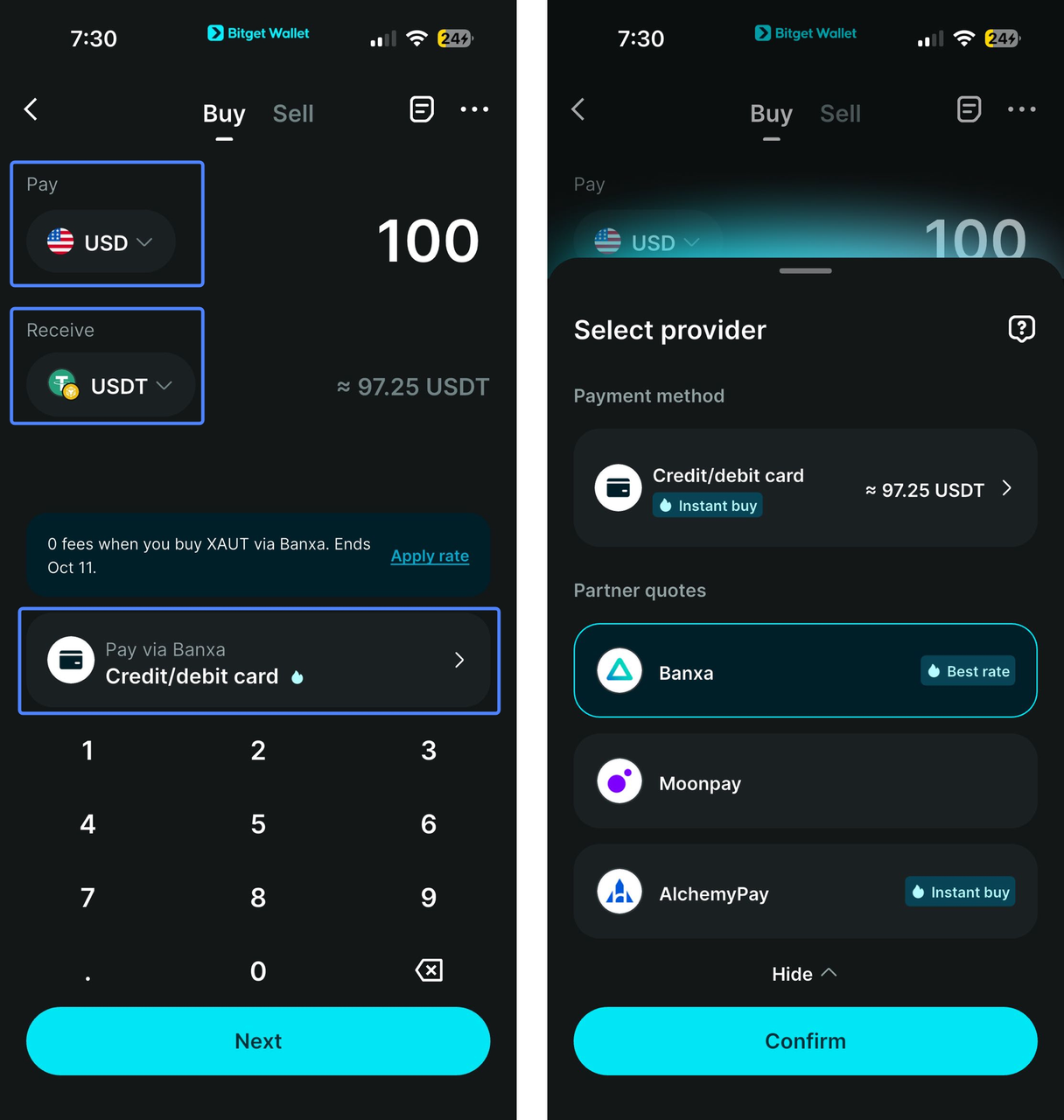
Select a payment provider
Review the available providers and payment methods for your purchase. If multiple providers are available, compare the quoted amount, fees, and payment options before continuing.
If you want to buy Bitcoin with a Visa card or purchase another supported asset using your Visa card, make sure Visa is listed as an available payment method.
-
Complete identity verification
Card-based crypto purchases can require KYC, or Know Your Customer, verification.
In the Buy Crypto flow, you may be asked to verify your identity using a passport or ID card. Use accurate information that matches the required details to avoid delays during the purchase.
-
Complete your Visa payment
Follow the payment provider's instructions to enter your Visa card details and complete the transaction.
Before confirming the payment, review:
-
The cryptocurrency you are buying
-
The blockchain network
-
The amount of crypto you will receive
-
The fiat amount you will pay
-
The exchange rate
-
Any applicable fees
Once the payment succeeds, you will be redirected back to the wallet, where you can check your balance and view the deposit order.
Crypto purchases usually arrive within minutes. If your purchased crypto has not arrived after 15 minutes, check the order status and contact support if needed.
Troubleshooting a failed Visa payment
A declined Visa crypto purchase does not necessarily mean that Visa cards cannot be used to buy crypto.
Common reasons include:
-
Your card issuer declined the transaction.
-
The payment provider does not support your card type or region.
-
Your KYC information is incomplete or does not match the required details.
-
The selected provider is temporarily unavailable.
-
The payment quote expired before the transaction was completed.
-
Your card has restrictions on cryptocurrency transactions.
-
The selected asset or network is not supported by the payment provider.
If a purchase fails, first check the error message and payment provider details. If more than one provider is available, you can also check whether another option supports your payment method.
Managing your crypto after purchase
Buying crypto is only the first step. Once the asset arrives in your wallet, you can decide how you want to use it based on the asset and network you purchased.
Spend crypto with Bitget Wallet Card
The
Bitget Wallet Card is different from the Visa card you use to buy crypto.
Your Visa credit or debit card can be a payment method for purchasing crypto. The Bitget Wallet Card works in the other direction: it lets you spend eligible crypto through supported Visa or Mastercard payment networks.
You can top up the card with supported cryptocurrencies such as USDT, USDC, ETH, and SOL, then spend at supported merchants. Apple Pay and Google Pay are also supported in eligible regions. The card is currently available across 50+ countries and regions.
Swap or trade your crypto
If you want to exchange one asset for another, you can use the wallet's
swap and trading features without first moving your crypto to a separate platform.
For example, you can swap a stablecoin for another supported crypto asset if you want to change your holdings or use the asset for another purpose.
The wallet supports more than 1 million crypto and tokenized assets across 130+ blockchains, giving you access to a broad range of assets and networks from one self-custodial wallet.
Send crypto across supported networks
You can also send your crypto to another wallet or supported platform.
Always check the blockchain network before confirming a transfer. The sending and receiving sides need to support the same network, and you need to use the correct wallet address for that network.
This is especially important for assets such as USDT and USDC, which are available across multiple blockchains.
Use eligible stablecoins with Earn
If you buy a stablecoin and want to explore yield opportunities, the wallet also provides
Earn products.
Stablecoin Earn currently supports USDC, including flexible withdrawal options through Stablecoin Earn Plus. Rates and availability can change, so review the current product terms before depositing funds.
If you purchase USDT instead, you can swap it for a supported stablecoin such as USDC before checking the available Earn options.
Start buying crypto with Bitget Wallet
Now that you’ve learned how to buy crypto with a Visa card, from choosing a supported payment method to checking fees, verification, and the right blockchain network, you’re ready to put that knowledge into practice.
Alongside buying crypto, Bitget Wallet lets you continue managing your assets from the same self-custodial wallet. After buying, you can swap assets, send them across supported networks, spend eligible crypto with Bitget Wallet Card, or explore other available wallet features.
When you're ready to buy, you can explore the available payment methods and supported assets directly in Bitget Wallet.
FAQ
Can I buy Bitcoin with a Visa card?
You can buy Bitcoin with a Visa card when the available payment provider supports Visa payments in your region. The available payment methods, fees, and verification requirements depend on the provider and transaction.
Can I buy crypto with a prepaid Visa card?
Some prepaid Visa cards can be used for crypto purchases, but acceptance depends on the card issuer and payment provider. Check whether the card allows cryptocurrency transactions before attempting the purchase.
Can I buy crypto with a Visa gift card?
Visa gift cards are subject to issuer and payment-provider restrictions. Some can be used for online purchases but do not support cryptocurrency transactions, so acceptance is not guaranteed.
Is buying crypto with a Visa card safe?
A Visa card does not remove the normal risks of buying cryptocurrency. Review the payment provider, transaction details, network, and fees before confirming a purchase, and keep your crypto in a self-custodial wallet you trust.
Risk Disclosure: Cryptocurrency trading involves high market risk. Bitget Wallet is not responsible for any trading losses incurred. Always do your own research and trade responsibly.
Table of contents

Recommended
 How to Apply for a Crypto Mastercard2026-01-05 | 5 mins
 How to Apply for a Crypto Visa Card and Start Spending Crypto Worldwide2026-01-02 | 5 mins
- How to Top Up Your Crypto Debit Card with USDT2025-12-29 | 5mins



